> ## Documentation Index
> Fetch the complete documentation index at: https://docs.gbox.ai/llms.txt
> Use this file to discover all available pages before exploring further.

# Introduction

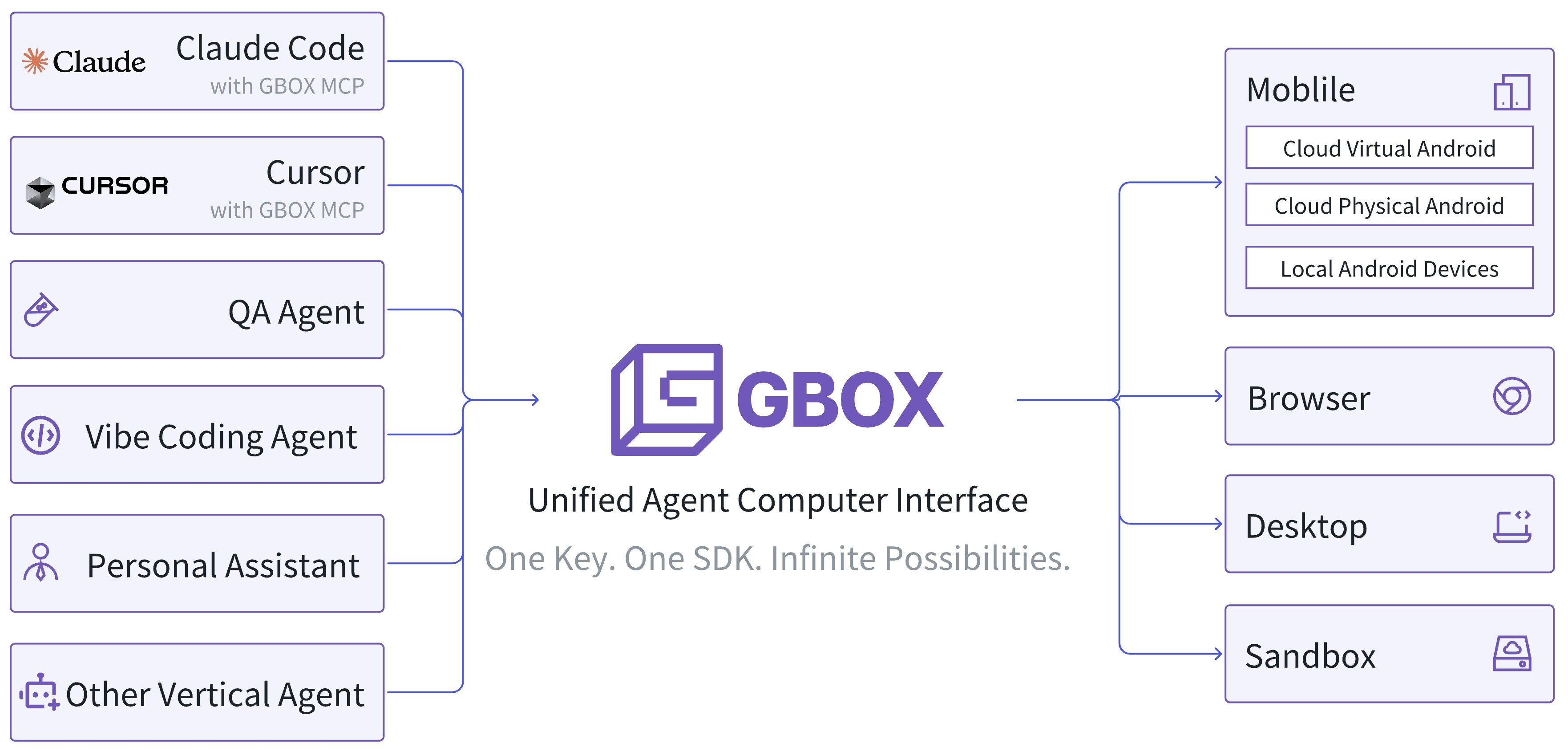
> GBOX provides environments for AI Agents to operate computer and mobile devices.

<img src="https://mintcdn.com/gbox-551f8aad/O6mTSsIUVVqUmdRb/assets/gbox-introduction.jpeg?fit=max&auto=format&n=O6mTSsIUVVqUmdRb&q=85&s=84d8f0663de3ee0ad83d7b292a1fb87b" alt="Introduction" width="3524" height="1698" data-path="assets/gbox-introduction.jpeg" />

# Environments

GBOX supports four types of environments: Mobile, Browser, Desktop and Sandbox.

<div className="overflow-x-auto">
  <table className="border-collapse border border-purple-100 dark:border-purple-300">
    <thead>
      <tr className="bg-purple-50 dark:bg-purple-900/20">
        <th className="border border-purple-300 dark:border-purple-300 p-3 text-center align-middle text-purple-900 dark:text-purple-100" />

        <th className="border border-purple-300 dark:border-purple-300 p-3 text-center align-middle dark:text-purple-100 w-1/3">
          **Environment OS**
        </th>

        <th className="border border-purple-300 dark:border-purple-300 p-3 text-center align-middle dark:text-purple-100 w-full">
          **Highlights**
        </th>
      </tr>
    </thead>

    <tbody>
      <tr>
        <td className="border border-purple-300 dark:border-purple-300 p-3 text-center align-middle font-semibold text-purple-900 dark:text-purple-100">
          **Mobile**
        </td>

        <td className="border border-purple-300 dark:border-purple-300 p-3 text-center align-middle dark:text-purple-100">
          Android
        </td>

        <td className="border border-purple-300 dark:border-purple-300 p-3 align-middle dark:text-purple-100">
          • Supports physical devices running on cloud
          <br />• Supports registration of your own Android device(s)
        </td>
      </tr>

      <tr>
        <td className="border border-purple-300 dark:border-purple-300 p-3 text-center align-middle font-semibold text-purple-900 dark:text-purple-100">
          **Browser**
        </td>

        <td className="border border-purple-300 dark:border-purple-300 p-3 text-center align-middle dark:text-purple-100">
          Linux - Chrome
        </td>

        <td className="border border-purple-300 dark:border-purple-300 p-3 align-middle dark:text-purple-100">
          • Supports Playwright
          <br />• Supports Multi-tabs Browsing
        </td>
      </tr>

      <tr>
        <td className="border border-purple-300 dark:border-purple-300 p-3 text-center align-middle font-semibold text-purple-900 dark:text-purple-100">
          **Desktop**
        </td>

        <td className="border border-purple-300 dark:border-purple-300 p-3 text-center align-middle dark:text-purple-100">
          Linux - XFCE
        </td>

        <td className="border border-purple-300 dark:border-purple-300 p-3 align-middle dark:text-purple-100">
          • Fully functional Linux desktop
        </td>
      </tr>

      <tr>
        <td className="border border-purple-300 dark:border-purple-300 p-3 text-center align-middle font-semibold text-purple-900 dark:text-purple-100">
          **Sandbox**
        </td>

        <td className="border border-purple-300 dark:border-purple-300 p-3 text-center align-middle dark:text-purple-100">
          Linux - Ubuntu
        </td>

        <td className="border border-purple-300 dark:border-purple-300 p-3 align-middle dark:text-purple-100">
          • Instant creation under 150ms
          <br />• Run any code or command
        </td>
      </tr>
    </tbody>
  </table>
</div>

The GBOX SDK supports operating UI environments via natural language, such as:

```typescript theme={null}
import GboxSDK from "gbox-sdk";

const gboxSDK = new GboxSDK({
  apiKey: process.env["GBOX_API_KEY"], // This is the default and can be omitted
});

async function main() {
  const box = await gboxSDK.create({ type: "android" });
  // Natural language click
  await box.action.click({
    target: "login button on the upper right corner",
  });
}

main();
```

# Why GBOX

Traditional AI development is fragmented and complex. You need separate tools for mobile testing, desktop automation, web scraping, and sandboxed execution. Each environment requires different SDKs, authentication methods, and deployment processes.

GBOX unifies everything under one interface. Whether you're building an AI agent that needs to interact with Android apps, Linux desktops, web browsers, or sandboxed execution environments—it’s all accessible through the same SDK and API.

**Key Benefits**

* **Rapid Prototyping**: Go from idea to working agent in minutes, not days. Spin up a sandbox environment instantly to test your agent's logic, then seamlessly deploy to real devices.

* **True Cross-Platform**: Your agent code works identically across mobile, desktop, browser, and sandbox environments. Write once, run anywhere.

* **Cloud-Ready Deployment**: Start locally, then run the same agent code on hosted devices without modification. GBOX manages provisioning and environment setup for you.

* **Natural Language Control**: No need to learn platform-specific automation libraries. Describe what your agent should do in plain English - GBOX translates that into precise device interactions.

# Scenarios

## QA Agent

You can use the GBOX SDK to build your own QA Agents.

<iframe className="w-full aspect-video rounded-xl" src="https://www.youtube.com/embed/_nI5BjOQClY" title="YouTube video player" frameBorder="0" allow="accelerometer; autoplay; clipboard-write; encrypted-media; gyroscope; picture-in-picture; web-share" referrerPolicy="strict-origin-when-cross-origin" allowFullScreen />

## Develop/Test Android App with Claude Code

Enable your Claude Code session to operate Android through GBOX Android MCP.

<iframe className="w-full aspect-video rounded-xl" src="https://www.youtube.com/embed/IzlZFsqC4CY" title="YouTube video player" frameBorder="0" allow="accelerometer; autoplay; clipboard-write; encrypted-media; gyroscope; picture-in-picture; web-share" referrerPolicy="strict-origin-when-cross-origin" allowFullScreen />

## Mobile Automation with Claude Code

Assign almost any task to Claude Code, good luck!

<iframe className="w-full aspect-video rounded-xl" src="https://www.youtube.com/embed/Op3ZSVg-qg8" title="YouTube video player" frameBorder="0" allow="accelerometer; autoplay; clipboard-write; encrypted-media; gyroscope; picture-in-picture; web-share" referrerPolicy="strict-origin-when-cross-origin" allowFullScreen />
